

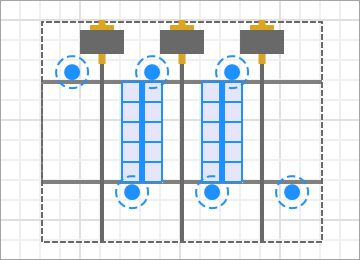
 A Storage element with stacker cranes enabled
A Stacker Crane System is an auxiliary markup element that appears in Storage elements configured to use stacker cranes. Stacker Crane System represents the automated servicing system of the storage and defines the behavior and parameters of the cranes that handle the placement and retrieval of agents in the rack system.
Demo model: Stacker Crane Store Open the model page in AnyLogic Cloud. There you can run the model or download it (by clicking Model source files). Demo model: Stacker Crane StoreOpen the model in your AnyLogic desktop installation.The system automatically creates cranes in the aisles between the racks. The cranes move along rails positioned in the center of the aisles.
To create the system, enable the Stacker cranes option in the Storage is served with property of the Storage markup. Stacker cranes are then created automatically in the storage aisles and, when applicable, in the passage alongside the outer racks. Their rails are positioned automatically based on the storage layout, and some crane dimensions are derived from the rack dimensions and update together with changes to the Storage markup.
To modify the initial position of the shuttle, use the handle located at the center of the shuttle and drag it along the aisle.
To configure the system, click any crane in the graphical editor to open the properties of the entire stacker crane system.
The stacker crane system can automatically generate markup elements representing input and output stations. Depending on the selected configuration, the generated elements are either Conveyor or Point Node markup elements.
The properties of the stacker crane system determine both the type and the location of the generated markup. The generated elements are positioned automatically relative to the associated Storage markup and the selected station location.
When the stacker crane system is selected in the graphical editor, markers appear at the available input/output station locations. Click a marker to cycle its state between Input, Output, and Not in use.
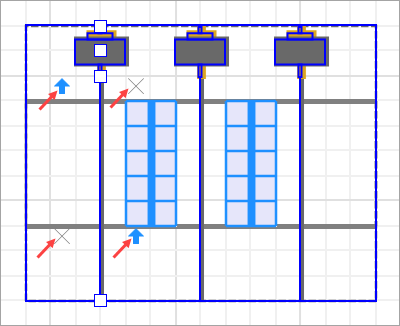
Only one input station can be configured for a stacker crane system. If multiple locations are marked as inputs, only one of them will be kept when the configuration is applied.
The working area of a stacker crane defines which loading and unloading stations can be served by the crane. The agents to be stored must be located within the working area of the crane. When retrieving agents, the unloading station is selected from the output stations located within the crane working area.
- Stacker cranes are treated as obstacles by conveyors. As a result, conveyors cannot enter an aisle served by a stacker crane. The restricted area is defined by the rail length and the aisle width.
- When a stacker crane picks up an agent, the agent moves together with the crane trolley until it is unloaded.
- General
-
Name — The name of the stacker crane system. The name is used to identify and access the system from the code and library blocks.
Ignore — If selected, the stacker crane system is excluded from the model.
Visible on upper agent — If selected, the system is included in the agent presentation. This means that if the agent hosting the system is embedded in another agent, the system will remain visible.
Lock — If selected, the stacker crane system shape is locked. Locked shapes do not react to mouse clicks, so it is impossible to select them in the graphical editor until you unlock them. This may prove useful when you want to prevent editing this shape while drawing other shapes over it.
Visible — Defines whether the shape is visible on the animation at runtime.
Material item type — The type of the material item that is served by this stacker crane system.
Is obstacle — If selected, this stacker crane system will be considered an obstacle for pedestrians and transporters moving in free space mode.
Speed properties for stacker crane systems support two local variables:isLoaded — a Boolean value that shows if the stacker crane system is occupied at the moment; is not supported by Transfer speed
agent — the agent being transported; null if noneTravel speed — The speed of the horizontal movement of the stacker crane base within the aisle.
Lift speed — The speed of the vertical movement of the lift.
Transfer speed — The speed of the forks that transfer agents between the trolley and a storage cell or unloading station.
- Actions
-
On new SRM system — The code that is executed when a stacker crane is created in the storage system.
Local variable:
T unit — the stacker craneOn unit state changed — The code that is executed when the state of a stacker crane changes.
Local variables:
T unit — the stacker crane
StorageResourceManagementUnitState state — the state of the crane - Input/Output System
-
System type — Defines how the input/output system of the stacker crane is represented in AnyLogic:
Conveyor — The input/output system is a conveyor.
Point node — The input/output system is a point node.In the UI, the location terms are relative to the orientation of the Storage markup element placed on the diagram from the palette:Front — toward the lower side of the diagram
Back — toward the upper side of the diagram
Right — the right-hand side when facing from the back of the storage toward the front
Left — the left-hand side when facing from the back of the storage toward the frontInput system location — Defines where the input part of the system is located relative to the storage and aisle. One of the following: Front Left, Front Right, Back Right, Back Left.
Output system location — Defines where the output part of the system is located relative to the storage and aisle. One of the following: Front Left, Front Right, Back Right, Back Left.
Create conveyors — [Visible if System type: Conveyor] Creates conveyors at the specified input and output locations.
Create nodes — [Visible if System type: Point node] Creates point nodes at the specified input and output locations.
- Appearance
-
Crane type — Defines the crane type. One of the following:
Single — a single-mast crane
Double — a double-mast craneFrame color — The color of the frame. Select No fill if you do not want the frame to be colored.
Trolley color — The fill color of the stacker crane trolley. Select No fill if you do not want the area to be colored.
Rail color — The color of the stacker crane rail. Select No fill if you do not want the rail to be colored.
- Position and size
-
The position and dimensions of the stacker crane are derived automatically from the associated Storage markup:
Level — obtained from the associated storage
X, Y — obtained from the storage geometry and the configured base and trolley offsets
Z — obtained from the storage geometry
Trolley width and trolley length — derived from the width of the storage bay
Mast height — derived from the rack height plus half of the shelf heightRail offset — Defines the length of the rail section extending beyond the storage rack, allowing the crane to place or retrieve agents at nearby conveyor stations or other external positions.
Crane offset — Defines the offset of the trolley home position from the storage entry point. Must be greater than Rail offset.
Base length — Defines the length of the crane base.
Initial lift height — Defines the initial height of the lift at model startup. The height is measured from the zero Z-height.
- Advanced
-
Show in — Defines whether the stacker crane system is displayed both In 2D and 3D animation, in 2D only, or in 3D only.
Show name — If selected, the name of the stacker crane system is displayed on the graphical diagram.
To obtain the underlying StackerCrane object and access its API, use the following functions of the Storage object:
| Function | Description |
|---|---|
| List<StackerCrane> getStackerCranes() | Returns the list of all stacker cranes located in the aisles of the storage. The cranes in the list are ordered by the racks they serve, starting from the first rack. |
| StackerCrane getStackerCrane(int index) |
Returns the stacker crane with the specified index within the storage. index — the index of the stacker crane |
Additionally, the following function of the StorageSystem block allows to access stacker cranes:
| Function | Description |
|---|---|
| List<StackerCrane> getStackerCranes() | Returns the list of all stacker cranes located in the aisles of the storage. The cranes in the list are ordered by the racks they serve, starting from the first rack. |
- General
-
Function Description T getServicedAgent() Returns the agent that has seized the stacker crane if the crane is loaded; otherwise, returns null. List<T> getAgents() Returns the list of agents that have seized the stacker crane. List<T> getAgentsInQueue() Returns the list of agents in the internal queue of the stacker crane. The list is ordered by priority, from highest to lowest. The returned list can be modified, but changes to it do not affect the actual queue of the crane. void moveToInputStation() Orders the stacker crane to move to the nearest accessible input station of the specified type. This function should not be used simultaneously with crane movement initiated by the Store or Retrieve blocks, or an exception will occur.void fail() Disables the stacker crane. void repair() Commands the stacker crane to resume the normal functioning. - Component positions
-
Function Description Position getTrolleyPosition() Returns the current position of the center of the trolley at 0 Z. The position consists of coordinates and the rotation coefficient. Position getFramePosition() Returns the current position of the stacker crane at 0 Z. The position consists of coordinates and the rotation coefficient. Position getMastPosition() Returns the current position of the mast. The position consists of coordinates and the rotation coefficient. - Statistics
-
Function Description StackerCraneState getState() Returns the current state of the stacker crane. double timeInState(StackCraneState state) Returns the time the stacker crane has spent in the specified state, in model time units.
state — the desired statedouble timeInState(StackCraneState state, TimeUnits units) Returns the time the stacker crane has spent in the specified state, in specified time units.
state — the desired state
units — the time unitsdouble averageStorageTime() Returns the average time required for the stacker crane to store a load in the rack system, measured from the start of loading to the completion of unloading, in model time units. double averageStorageTime( TimeUnits units ) Returns the average time required for the stacker crane to store a load in the rack system, measured from the start of loading to the completion of unloading, in the specified time units.
units — the time unitsdouble averagePickingTime() Returns the average time required for the stacker crane to retrieve a load from the rack system, measured from the start of loading to the completion of unloading, in model time units. double averagePickingTime(TimeUnits units) Returns the average time required for the stacker crane to retrieve a load from the rack system, measured from the start of loading to the completion of unloading, in the specified time units.
units — the time unitsdouble getUtilization() Returns the utilization of the stacker crane, calculated as the ratio of the crane working time to either its total lifetime or the time elapsed since the last call of resetStats(). int numberOfAgentsHandled() Returns the number of agents handled by the stacker crane during the entire model run or since the last call of resetStats(). void resetStats() Resets all collected statistics and starts collecting them again from zero.
-
How can we improve this article?
-