


While using events is straightforward, sometimes you need to define more sophisticated behavior that cannot be defined using events and dynamic events. This can be done using statecharts. A statechart is the most advanced construct for describing event- and time-driven behavior. For some objects, this event- and time-ordering of operations is so pervasive that you can best characterize the behavior of such objects in terms of a state transition diagram: a statechart.
Statecharts have states and transitions. Transitions can be triggered by conditions defined by the user, such as timeouts, rates, messages, agent arrival, or Boolean conditions. Transition execution can lead to a state change where a new set of transitions becomes active. States in the statechart can be hierarchical, meaning they can contain other states and transitions.
Statecharts are used to show the state space of a given algorithm, the events that cause a transition from one state to another, and the actions that result from state changes.
By using statecharts, you can visually capture a wide variety of discrete behaviors, much richer than the basic idle/busy, open/closed, or up/down statuses offered by most block-based tools.
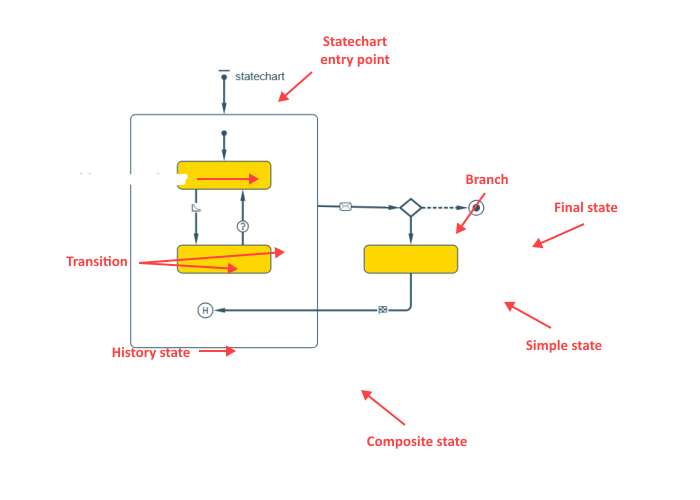
Demo model: Statechart for Generic Resource Open the model page in AnyLogic Cloud. There you can run the model or download it (by clicking Model source files). Demo model: Statechart for Generic ResourceOpen the model in your AnyLogic desktop installation.Statechart behavior can be defined in the graphical editor using the following statechart constructs:


You will find the statechart elements in the  Statechart palette.
-
How can we improve this article?
-