


A state represents the location of control and has a particular set of reactions to conditions and/or events. A state can be either simple or, if it contains other states, composite. Control always resides in one of the simple states, but the current set of reactions is a union of those of the current simple state and of all composite states containing it: a transition exiting any of these states can be taken.
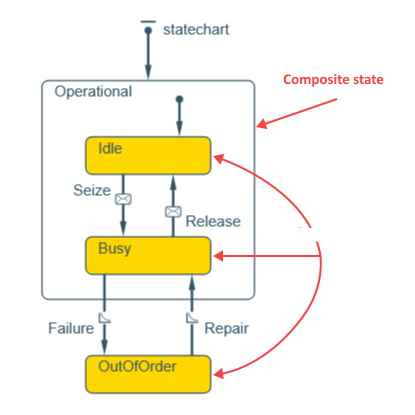 State types
To create a simple state
-
Drag the
 State element from the
  Statechart palette onto the agent diagram to create a default-sized state.
-
To create a custom-sized state, use the drawing mode. To activate it, click the State element in the palette. Its icon will turn into
 . Now you can draw the desired shape by dragging.
To create a composite state
The default State element is rather small, and there are two ways to draw a composite state.
- Drag the State element from the Statechart palette onto the agent diagram.
- Resize the default-sized element using the handles so that it can contain the required elements without intersecting them.
-
Use drawing mode by clicking the State element in the palette. Its icon will turn into .
- Draw the desired shape by dragging. You can either draw the composite state first and create the enclosed chart inside it, or use dragging to place the composite state element over the chart you want to enclose.
- General
-
Name — The name of the state. It is used to identify the element within the statechart and access it from code.
Show name — If selected, the name of the element is displayed in the presentation diagram.
Ignore — If selected, the state is excluded from the model.
Fill color — Click the control and select the desired color in the Colors dialog box. By default, simple states are filled with gold, whereas composite states have a no color fill.
- Actions
-
 Add:
Add:- Entry action — Here you can type Java code to be executed when the statechart enters the state.
- Exit action — Here you can type Java code to be executed when the statechart exits the state.
-
Function Description T getContainerState() Returns the upper level state of this state, or null if this state is at the topmost level (is not nested).
Set<T> getFullState() Returns the unordered set containing this state and all composite states (if any) containing this state.
Collection<T> getSimpleStatesDeep() Returns the collection of all simple states inside this state. Statechart<T> getStatechart(Agent agent) Returns the statechart for the given agent. Returns null if the agent has no statechart containing this state.
agent — the agent you want to get the statechart forSet<T> getStatesInside() Returns an unordered set of all states (both simple and composite) contained inside this state. boolean inState(Agent agent) Returns true if this state is active for the specified agent; returns false otherwise.
agent — the agent that owns this stateboolean containsState(IStatechartState simpleState) Checks if this state of a statechart is composite and contains the simpleState state (deep contents — inside contained composite states — are also checked). boolean isSimpleState() Returns true if this state is a simple state, false if composite. String name() Returns the name of this state. int ordinal() Returns the ordinal number of this state (states are numbered in a deterministic order).
-
How can we improve this article?
-