


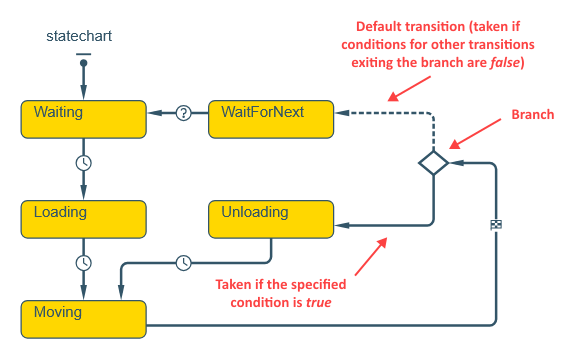
A Branch element represents a transition branching and/or connection point. Using branches, you can create a transition that has more than one destination state, as well as several transitions that merge together to perform a common action. This is a pseudo state: a transition with branches can be considered as instant (taking zero time) and atomic.
When control passes a branch, its action is executed, and then the conditions for transition exiting the branch are evaluated. The first enabled transition — the transition whose condition evaluates to true — is taken.
Control never stays in a branch state, it always passes through. Therefore, triggers cannot be specified for transitions exiting branches. When control passes a branch, the branch action is always executed.
Demo model: Transition with Branches Tests Numbers Open the model page in AnyLogic Cloud. There you can run the model or download it (by clicking Model source files). Demo model: Transition with Branches Tests NumbersOpen the model in your AnyLogic desktop installation.To draw a branch state
-
Drag the
 Branch element from the
  Statechart palette onto the agent’s graphical diagram, right to the place where you want this branch.
- General
-
Name — The name of the branch state. The name is used to identify the state within the statechart.
Show name — If selected, the name of the branch state is displayed in the presentation diagram.
Ignore — If selected, the branch state is excluded from the model.
Action — Here you can specify Java code to execute when the statechart enters the branch state.
Transitions exiting branch states have slightly different properties:
-
Conditional — If selected, this transition will be taken when the specified boolean Condition is true. The conditions must be exhaustive and unambiguous. If two or more conditions evaluate to true, one of the transitions is selected non-deterministically.
Default (is taken if all other conditions are false) — If selected, the transition is the default branch exit and will be taken if conditions defined for all other transitions exiting the branch state are false. There can only be one default transition for every branch. If all outgoing transitions are closed and there is no default exit from a branch, a runtime error is issued.
Conditional transitions are drawn solid. Default transitions are drawn dashed. Every transition exiting a branch is first drawn as a default one. The non-default ones should be set as Conditional in the properties.
Transitions exiting branches do not have Guard conditions.
-
How can we improve this article?
-