


The Initial State Pointer targets the state within a composite state to be entered first. If the control is passed to a composite state, an initial simple state is found inside it by following the initial state pointer down the state hierarchy, and this state becomes the active one.
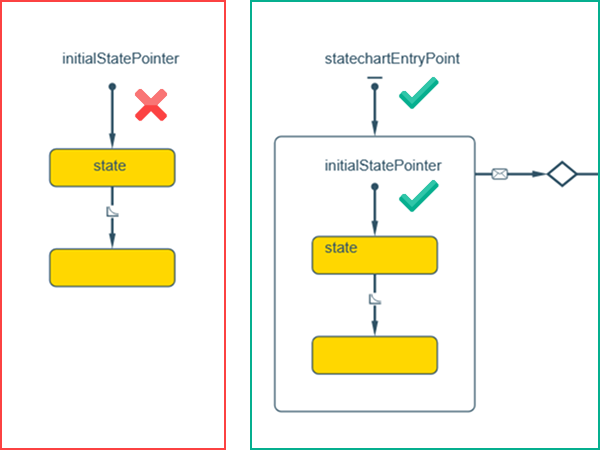
Each level in a composite state must have only one initial state.
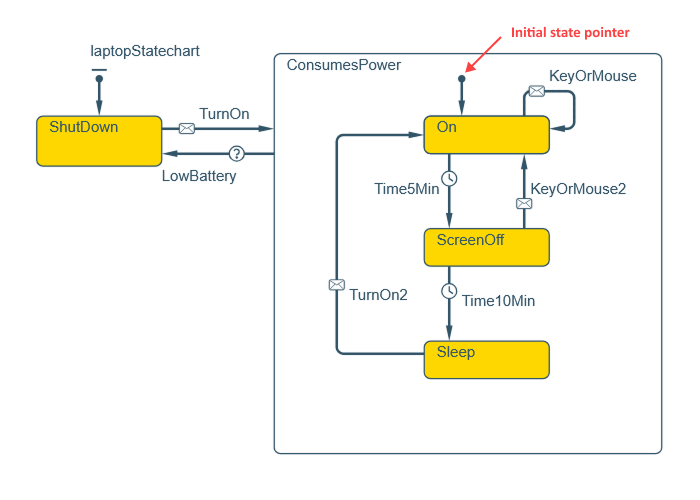
To create an initial state pointer
-
Drag the
 Initial State Pointer element from the
  Statechart palette onto the agent diagram.
- Drag the endpoint of the initial state pointer onto the boundary of the target state or pseudo state (a state that is instant and atomic).
- General
-
Name — The name of the initial state pointer. It is used to identify and access the element from code.
Show name — If selected, the name of the element is displayed in the presentation diagram.
Ignore — If selected, the element is excluded from the model.
Action — Here you can specify Java code to execute when the initial state pointer forwards the control to an initial state.
The initial state of the entire statechart is defined not by an initial state pointer, but by a statechart entry point.
-
How can we improve this article?
-