


Use the  GIS Region element to mark up an area on the map.
A GIS Region element can be added to a GIS map only. You need to add a  GIS Map to your model before you add any GIS markup.
To add an existing region
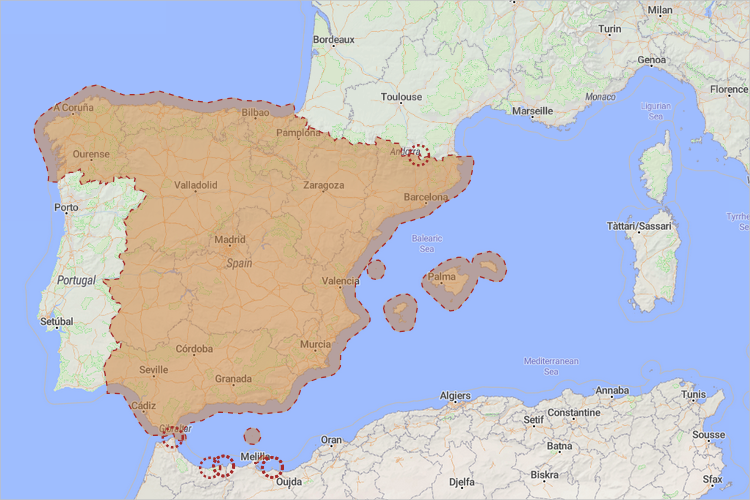
- The simplest way to add a GIS region to the map is creating one using the search menu. You can convert a search result to a GIS region or multiregion with a right click, selecting Convert to GIS region in the context menu. The created GIS region will have its title automatically filled in with the full address of the location.
To draw a custom region
- Click the GIS Region element from the GIS section of the
 Space Markup palette. The cursor should turn into
  . This means the drawing mode is activated and you can now draw a region on the map point by point.
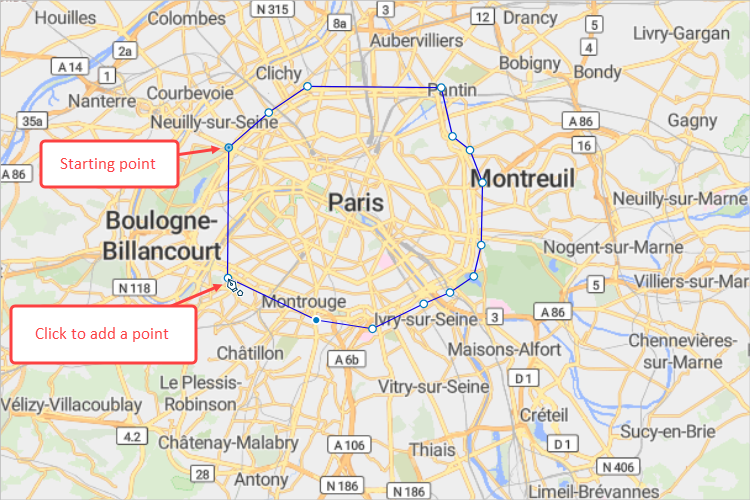
 - Click the map to place points that would turn into the region boundary.
-
Double-click to place the final point and finish drawing.
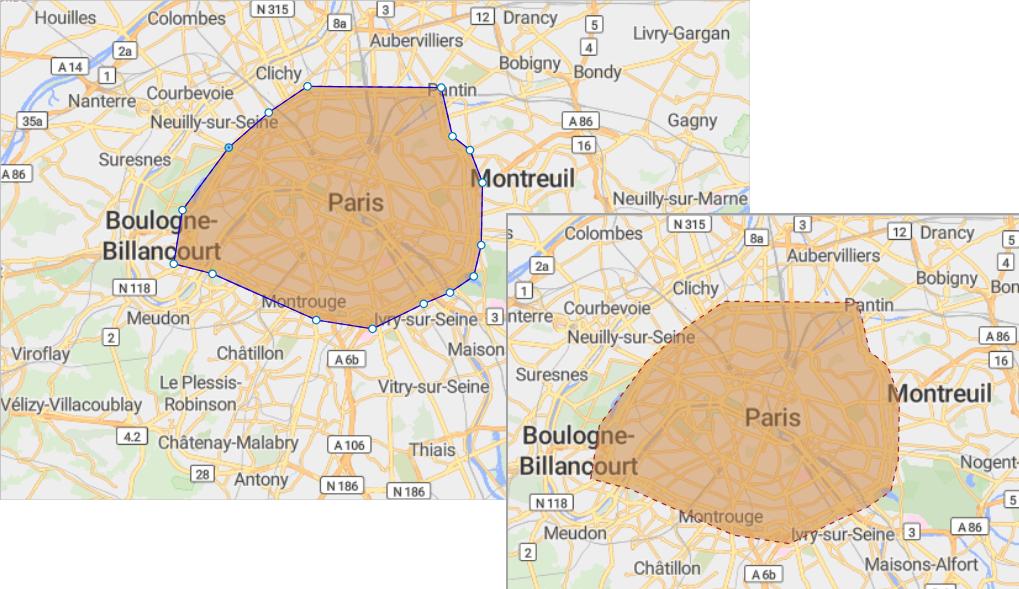
- Now you can edit the appearance of this space markup shape.
- General
-
Name — The name of the region. The name is used to identify and access the region from code.
Lock — If selected, the element is unresponsive: it will ignore mouse actions at model design time. To select the element, click its icon in the elements view.
Ignore — If selected, the region is excluded from the model.
Fixed position — If selected, repositioning by dragging is disabled. The shape cannot be moved, but you can select it to change other properties.
Title — Here you can type the title for this region. The title that you define in this field is accessible at runtime via API. When you convert a search result to a GIS region, its title will be automatically filled with the full name of that region.
- Appearance
-
To select a permanent color or no color, use the color picker. To make the color, line width or line style change dynamically, switch the respective field to the dynamic value editor and specify the expression to be re-evaluated.
Fill color — The GIS region’s fill color.
Line color — The GIS region’s outline color.
Line width — Line width. To define it, use the buttons, define a value or enter a dynamic expression.
Line style — Line style: solid, dashed, or dotted. To define it, use the buttons or insert a dynamic value.
- Visibility and presentation
-
Visible — If selected, the shape is visible in the presentation at model runtime. Can be set to a dynamic expression that makes the route visible when evaluated to true.
You can edit regions by dragging the boundary points. When you edit the GIS map itself, the boundary points of the region remain at their coordinates.
To move a point of a region boundary
- Select the region on the map.
- Drag the necessary point.
To add a new point to a region boundary
- Select the region on the map.
- Double-click a segment of the region boundary where you want to add a new point.
To remove a point on a region boundary
- Select the region on the map.
- Double-click the point you want to remove.
You can dynamically modify the properties of a GIS point at model runtime using the following API.
- General
-
Function Description String getTitle() Returns the title of the element. void setTitle(String title) Sets the title of the element.
title — the title of the region.double area() Returns the area of this region, in m2. double area(AreaUnits units) Returns the area of this region, in the specified units.
units — a constant defining the area units.boolean isVisible() Returns true if the element is visible; returns false otherwise. void setVisible(boolean v) Sets the visibility of the markup element.
v — visibility: true — visible, false — not.INetwork getNetwork() Returns the network this markup element belongs to, or null if this element isn’t a part of a network. GISRoute getConnection(int index) Returns the connection of this node with another node by index.
index — the index of the required connection in range (0, this.getConnectionsCount - 1).int getConnectionsCount() Returns the number of the node’s connections with other nodes. boolean contains(double lat, double lon) Returns true if the shape contains the point with the given coordinates; returns false otherwise.
lat — the latitude of the point.
lon — the longitude of the point.Point randomPointInside(Random rng, Point out) Returns a random point inside or along the given space markup element. This method uses a given Random Number Generator.
rng — the random number generator.
out — the output object to write to, may be null. - Distance
-
Function Description double getNearestPoint(double lat, double lon, Point out) Calculates the point in this space markup element nearest to the given point. Returns the square of distance to the nearest point, in meters.
lat — latitude measured in degrees: (-90° ... (South) ... 0° ... (North) ... 90°)
lon — longitude measured in degrees: (-180° ... (West) ... 0° ... (East) ... 180°)
out — the output point to write result to.double getNearestPoint(Point givenPoint, Point out) Calculates which point is nearest to the given point and writes it to the output parameter. Returns the square of the distance between these points, in meters.
givenPoint — given point.
out — the output point to write result to. - Appearance
-
Function Description Color getFillColor() Returns the fill color of the shape, or null if shape has no fill color or has textured fill (in this case getFillTexture() should be used instead). void setFillColor(Paint color) Sets the fill color (or texture) of the shape.
fillColor — the new fill color, null — do not fill the shape.Color getLineColor() Returns the outline color of the markup element, or null if markup element has no line color or has textured outline (in this case getLineTexture() should be used instead). void setLineColor(Paint lineColor) Sets the line color (or texture) of the markup element.
lineColor — the new line color, null — do not draw the markup element line.LineStyle getLineStyle() Returns the line style of the markup element.
Valid values:
LINE_STYLE_SOLID
LINE_STYLE_DOTTED
LINE_STYLE_DASHEDvoid setLineStyle(LineStyle lineStyle) Sets the line style of the markup element.
lineStyle — the new style of the markup element.
Valid values:
LINE_STYLE_SOLID
LINE_STYLE_DOTTED
LINE_STYLE_DASHEDdouble getLineWidth() Returns the line width of the markup element. void setLineWidth() Sets the line width of the markup element, 0 means thinnest possible.
width — the new line width of the markup element.Texture getFillTexture() Returns the fill texture of the shape, if the shape has fill texture. Texture getLineTexture() Returns the line texture of the markup element, if the markup element has line texture. - Multiregion functions
-
Function Description String getTitle() Returns the title of the multiregion. void setTitle(String title) Sets the title to the multiregion.
title — title in quotation marks.List getRegions() Returns the list of regions that this multiregion contains. boolean add(GISRegion region) Adds a given region to the multiregion object.
region — a region to be added.boolean addAll(Collection regions) Adds all regions to the multiregion object.
regions — a collection of regions.boolean remove(GISRegion region) Removes a given region from the multiregion object.
region — a region to be removed.boolean removeAll(Collection regions) Removes all regions from the multiregion object.
regions — a collection of regions.double area() Returns the total area, in m2. double area(AreaUnits units) Returns the area of this multiregion, in specified units.
units — a constant defining the area units.void setVisible(boolean visible) Sets the visibility of the markup element.
v — visibility: true — visible, false — not.void setFillColor(Paint color) Sets the fill color (or Texture) of the shape.
fillColor — the new fill color.
null — do not fill the shape.void setLineColor(Paint color) Sets the line color (or Texture) of the markup element.
lineColor — the new line color, null — do not draw the markup element line.void setLineWidth(double width) Sets the line width of the markup element:
width — the width of the markup element line, in pixels.void setLineStyle(LineStyle lineStyle) Sets the line style of the markup element.
lineStyle — the new style of the markup element.
Valid values:
LINE_STYLE_SOLID
LINE_STYLE_DOTTED
LINE_STYLE_DASHEDGISRegion randomRegionInside() Returns a random region from this multiregion. - Removal
-
Function Description void remove() Removes the GIS region from the presentation. If the GIS region is not a part of the presentation, the function does nothing.
Removal from the presentation does not necessarily mean removing from the model logic, since logical networks and routes may have been created before the removal and survive it.
-
How can we improve this article?
-