


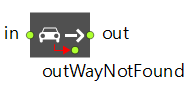
CarMoveTo is the block that controls the car movement. A car can move only when it is inside a CarMoveTo block. When a car enters CarMoveTo, it tries to calculate the way from its current location to the specified destination.
The destinations a car can move to include: a road, a parking lot, a bus stop, or a stop line. The specified destination must belong to the same road network as the one the car is currently in. If there is no way from the car’s current location to the specified destination, the car exits the block via the outWayNotFound port.
If a car is set to move to a road, the direction of the road should be additionally specified. The car will try to take the shortest path to get to the beginning of the specified road. Once on the road, the car will move along the specified road until it reaches the end of the road. As soon as a car reaches the end of the road, it should be immediately removed from the model by the CarDispose block or be sent to the other CarMoveTo to move further. If a car is unable to leave the end of the destination road immediately, an error is generated.
If a car is set to move to a parking lot, the car will move to the specified parking lot and try to reserve an available parking space. Cars reserve parking spaces only when they approach the parking lot. If a car is unable to reserve a parking space, it leaves the block via the outWayNotFound port. If a car is able to successfully reserve a parking space, it parks at the space and leaves the block. A car can remain in a parking space until it is removed from the road network or sent to another destination by the CarMoveTo block.
If a car is set to move to a bus stop, the car will move to the specified bus stop. If a bus stop is already occupied by another car, the car approaching the bus stop will stop at the bus stop and wait until the bus stop is vacant. When a car arrives at a bus stop, it parks at the stop and leaves the block. A car can remain at the bus stop until it is removed from the road network or is sent to another destination by the CarMoveTo block.
If a car is set to move to a stop line, there are two ways it can behave at the destination stop line. See the Behavior at stop line parameter for a description.
While the car is moving under the control of the CarMoveTo block, you can partially control it by using the Car API. You can also manually change the lane using the lane change API. A lane specified in this way takes priority over the lane selection policy defined in the block; see the property description and a reference on the setPreferredLane() API function.
- If the API is called without specifying an offset up to which the car should stay in a particular lane, the car continues to move in the lane defined by the API until it leaves the CarMoveTo block. After that, it follows the policy of the next block. If the next block does not change the lane selection policy (that is, the Change lane selection policy option is not selected), the car continues to follow the policy inherited from the previous block.
- If the API is called with an offset, the car follows the API-defined lane until it reaches the offset. After that, it resumes following the lane selection policy defined in the current CarMoveTo block.
- Moves to
-
The type of the destination to which the car will be sent: road, parking lot, stop line, or bus stop.
Name: movesTo
Type: RoadTrafficLibraryConstants.CarDestinationType
Set new value at runtime: set_movesTo(new value)
Valid values:
CarMoveTo.ROAD — road
CarMoveTo.PARKING_LOT — parking lot
CarMoveTo.STOP_LINE — stop line
CarMoveTo.BUS_STOP — bus stop -
[Visible and applies only if Moves to: Road]
The road to which the car will be sent. The movement direction needs to be specified below in the Destination parameter.
If the Road is not specified, or it is not found in the current road network, an error is generated.
If a car cannot find the way to the specified road through the road network, this car leaves the block via its outWayNotFound port.Type: Road
Local variable: T car — the car that is sent to the destination road - Destination
-
[Visible and applies only if Moves to: Road option]
Specifies the destination (end of forward lane or end of backward lane) of the road to which the car will move. If the road does not have the specified destination (that is, is one-way), an error is generated.Name: destination
Type: RoadTrafficLibraryConstants.CarRoadDestination
Set new value at runtime: set_destination(new value)
Valid values:
CarMoveTo.END_OF_FORWARD_LANE — end of forward lane
CarMoveTo.END_OF_BACKWARD_LANE — end of backward lane -
[Visible and applies only if Moves to: Parking lot]
The parking lot to which the car will be sent. The car starts movement from its current location to the specified parking lot. When it approaches the parking lot, it tries to reserve a parking space in the lot. If the car is able to reserve a parking space, it parks at this space and exits this CarMoveTo block. If the car cannot reserve a parking space (the parking lot has no free parking spaces), an error is generated.
If the Parking lot is not specified or is not found in the current road network, an error is generated.
If a car cannot find the way to the specified parking lot through the road network, the car leaves the block via its outWayNotFound port.Type: ParkingLot
Local variable: T car — the car that is sent to the parking lot -
[Visible and applies only if Moves to: Stop line]
The stop line to which the car will be sent. The car starts movement from its current location to the specified stop line. When it approaches the stop line, it decelerates, stops, and exits this CarMoveTo block (its behavior can be set in the Behavior at stop line option below).
If the Stop line is not specified or is not found in the current road network, an error is generated.
If a car cannot find the way to the specified stop line through the road network, the car leaves the block via its outWayNotFound port.Type: StopLine
Local variable: T car — the car that is sent to the stop line - Behavior at stop line
-
[Visible and applies only if Moves to: Stop line]
Specifies the behavior at destination stop line:Pass through stop line — The car does not stop before the stop line and exits the CarMoveTo block immediately after passing the specified stop line. The car should be immediately removed from the model or sent to another destination by another CarMoveTo block, otherwise an error will be generated.
Stop before stop line — The car will stop before the specified stop line. The car will exit the CarMoveTo block at zero speed. It is not necessary to immediately remove the car or send it to the next destination.Name: stopLineBehavior
Type: RoadTrafficLibraryConstants.CarStopLineDestinationBehavior
Set new value at runtime: set_stopLineBehavior(new value)
Local variable: T car — the car that is sent to the stop line
Valid values:
CarMoveTo.PASS_THROUGH_STOP_LINE — Pass through stop line
CarMoveTo.STOP_BEFORE_STOP_LINE — Stop before stop line -
[Visible and applies only if Moves to: Bus Stop]
The bus stop to which the car is sent. The car starts movement from its current location to the specified bus stop. When it approaches the bus stop, it tries to reserve a place in the bus stop. If the car is able to reserve place, it occupies this place and exits the CarMoveTo block. If the car cannot reserve place (the bus stop has no free place), the vehicle stops on the road right next to the bus stop, expecting its turn to enter the bus stop.
If the Bus stop is not specified or is not found in the current road network, an error is generated.
If the car cannot find the way to the specified bus stop through the road network, this car leaves the block via its outWayNotFound port.Type: BusStop
Local variable: T car — the car that is sent to the bus stop - A list of roads that must be included in the automatically calculated route for cars. These roads will be included in the route in the specified order, so you need to ensure that such a route exists.
Type: Road[]
Local variable: T car — the car - A list of roads that you want to exclude from the automatically calculated route for cars.
Type: Road[]
Local variable: T car — the car -
Defines whether the car’s lane selection policy changes in this block. By default, this option is disabled, meaning the car keeps the policy inherited from the previous block. When enabled, the Lane selection policy property becomes available, allowing you to specify a new policy for cars moving through this CarMoveTo block.
Type: boolean
Default value: false
Local variable: T car — the car - Lane selection policy
-
[Visible and applies only if the Change lane selection policy is enabled]
Allows changing the lane selection policy for cars moving through this block. By default, a car continues to follow the policy defined in the previous block. If the Change lane selection policy option is selected, a new policy can be set here. The selected policy remains in effect as the car passes through subsequent blocks, unless one of those blocks specifies a different policy.
The following options are available:Random lane — Places the car in a random lane. Selected by default.
Closest to median — Selects the lane closest to the median. For one-way roads, this is the outermost lane on the left (right-hand traffic) or on the right (left-hand traffic).
Closest to roadside — Selects the lane closest to the roadside. For one-way roads, this is the outermost lane on the right (right-hand traffic) or on the left (left-hand traffic). When this option is selected, the Number of lanes property determines how many lanes from the roadside are considered. The specific lane for each car is chosen randomly among these lanes.
Specified explicitly — Places the car on a specified lane, defined by the Lane index property.Name: laneSelectionPolicy
Type: RoadTrafficLibraryConstants.LaneSelectionPolicy
Default value: Random lane
Set new value at runtime: set_laneSelectionPolicy(new value)
Valid values:
CarMoveTo.LANE_RANDOM — Random lane
CarMoveTo.LANE_MEDIAN — Closest to median
CarMoveTo.LANE_ROADSIDE — Closest to roadside
CarMoveTo.LANE_EXPLICITLY — Specified explicitly -
[Visible and applies only if Lane selection policy: Closest to roadside]
Specifies how many lanes from the roadside edge are considered. The roadside lane is the outermost lane on the right (right-hand traffic) or on the left (left-hand traffic). The car is placed on a randomly selected lane among the specified lanes, starting from the roadside. The specified number may exceed the actual number of lanes on the road; in this case, any available lane is used.
The value must be a positive integer greater than zero.Type: int
Local variable: T car — the car -
[Visible and applies only if Lane selection policy: Specified explicitly]
Specifies the index of the lane where the car should be placed. Lane indices start at 0 (the outermost lane) and increase toward the innermost lane. If the specified Road does not have a lane with the given index, an error is generated.
Prior to AnyLogic 8.9.7, this property affected only the lane in which the car initially appeared. After creation, the car could move to any other lane. Starting with AnyLogic 8.9.7, the Specified explicitly policy also applies to subsequent movement. The car will attempt to stay in or return to the specified lane if it temporarily leaves it (for example, due to a turn or a road segment with fewer lanes).
To generate a car in a specific lane and allow it to change lanes freely, add a CarMoveTo or CarEnter block with the Lane selection policy set to Random lane.
The policy is flexible: if the car prefers a certain lane (for example, the second) and enters a one-lane segment, a warning will be displayed, but the car will continue moving. Once multiple lanes become available again, the car will return to the preferred lane.Type: int
Local variable: T car — the car
- On enter
-
The code that is executed when the car enters the block.
Local variable: T car — the car that enters the block
- On exit
-
The code that is executed when the car reaches its destination. If the destination was a road, the code is executed at the end of the destination road. If the destination was a parking lot, the code is executed when the car parks in a space in the specified parking lot.
Local variable: T car — the car that reached its destination
- On way not found
-
The code that is executed when a car cannot find its way to the specified destination from its current location.
Local variable: T car — the car that is unable to find the way
| Function | Description |
|---|---|
| long size() | Returns the number of cars inside this block. |
| java.util.List<Agent> getCars() | Returns a non-modifiable collection containing the cars that are currently in this block. |
- in
- The input port.
- out
- The output port.
- outWayNotFound
- The output port used by a car to leave the block if there is no way from the car’s current location to the specified destination.
-
How can we improve this article?
-